









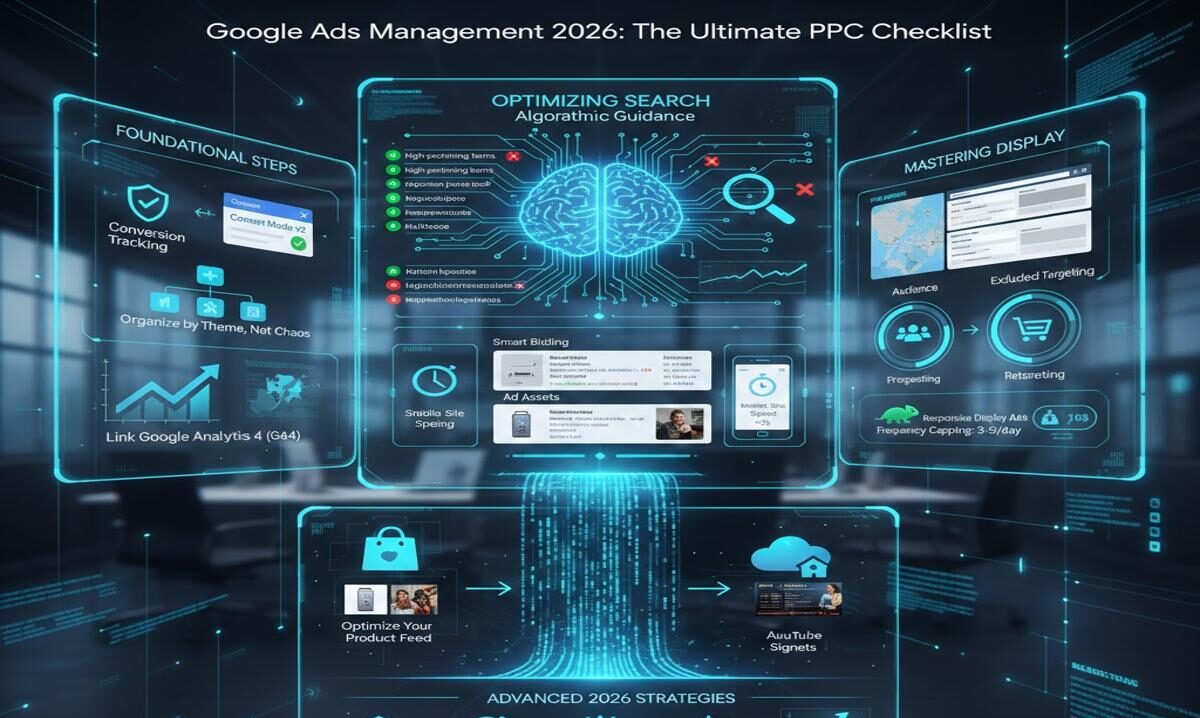
The digital advertising landscape of 2026 is defined by automation, artificial intelligence, and multi-surface experiences. Gone are the days of “set it and forget it”; successful Google Ads management now requires a strategic blend of human oversight and algorithmic guidance .
To help you navigate this complexity, we have created the ultimate PPC checklist. Whether you are managing text-based Search campaigns or visually engaging Display ads, this guide ensures your account structure is sound, your data signals are clean, and your creative is optimized for maximum ROI.
Phase 1: Foundational Steps in Google Ads Management (The “Must-Haves”)
Before diving into granular optimizations, you must ensure your account’s foundation is solid. In 2026, this means prioritizing data quality and structure.
- Verify Conversion Tracking & Consent Mode: Automation relies on data. Ensure Google Ads is accurately measuring conversions (purchases, leads, “begin checkout”). For European traffic, Consent Mode v2 is critical; without it, you are likely undercounting conversions and starving your smart bidding algorithms of essential data .
- Organize by Theme, Not Chaos: A well-structured account improves Quality Score and reduces wasted spend. Organize campaigns by product/service or location. Within each campaign, use Single Theme Ad Groups (STAGs) . Unlike outdated SKAGs (Single Keyword Ad Groups), STAGs group tightly-knit keywords (e.g., “leather crossbody bag,” “leather satchel”) to give the Google algorithm enough data to work with while maintaining relevance .
- Link Google Analytics 4 (GA4): Integrate your GA4 property to import conversion data (like engaged sessions or file downloads) and leverage audience lists for remarketing.
Phase 2: Optimizing Your Google Ads Management for Search
Search campaigns capture high-intent traffic. Optimization here focuses on refining keywords, ad copy relevance, and user experience.
- Mine the Search Terms Report Weekly: This is your goldmine. Review the queries that triggered your ads. Add high-performing, relevant terms as new keywords. Immediately add irrelevant terms as negative keywords to stop wasting budget .
- Revisit Bidding Strategy: Are your bids aligned with your goals? While manual bidding exists, Smart Bidding (like Target CPA or Target ROAS) leverages AI to adjust bids in real-time. If you have conversion data, trust the algorithms to find users more likely to convert .
- Audit Ad Copy & Assets: Don’t let your ads go stale.
- Rotate in new headlines and descriptions.
- Test different “offers” in your copy (e.g., “Free Shipping” vs. “24-Hour Sale”).
- Utilize all available ad assets (formerly extensions): sitelinks, callouts, structured snippets, and prices. These increase your ad’s real estate and CTR .
- Check Mobile Site Speed: Over 50% of traffic is mobile, yet mobile conversion rates often lag due to slow load times. Use tools like Google’s PageSpeed Insights to ensure your landing page loads in under three seconds. A slow site means you pay for clicks that never convert .
Phase 3: Mastering Display Campaigns in Google Ads Management
Display campaigns are about visibility, context, and retargeting. Success here depends on audience control and creative quality.
- Audit Placements: The Google Display Network (GDN) is vast, and your ads can end up on low-quality sites. Weekly, review the Placements Report. Exclude websites or apps that are irrelevant or driving high bounce rates to protect your brand safety .
- Refine Audience Targeting:
- Prospecting: Use affinity audiences and in-market audiences to find new users based on their interests and purchase intent .
- Retargeting: Target users who have previously visited your site. Segment these lists by behavior (e.g., “Cart Abandoners” vs. “Blog Readers”) to tailor your messaging .
- Leverage Responsive Display Ads: Upload at least 5 headlines, 5 descriptions, and 3 images/videos. Google’s AI will test combinations to find the best-performing assets for different placements across the web.
- Check Frequency Capping: Ensure you aren’t annoying potential customers. Set a frequency cap (e.g., 3-5 impressions per user per day) to manage ad fatigue .
Phase 4: Advanced 2026 Strategies (Performance Max & Signals)
Google is moving towards “campaign-agnostic” buying. Performance Max (PMax) campaigns are central to this, pulling assets across all inventory (Search, Display, YouTube, Discover). Managing PMax requires a different mindset.
- Optimize Your Product Feed (for Ecommerce): For Shopping and PMax, your product feed is your ad.
- Titles: Match user search behavior (e.g., “Women’s Striped Cotton T-Shirt” not “Soft Shirt 3000”).
- Images: High-quality, distinctive images are non-negotiable. Test lifestyle images vs. white backgrounds .
- Upload Audience Signals: In PMax campaigns, use audience signals to guide the algorithm. Upload lists of past converters (Customer Match). This tells the AI, “Find more people like these,” accelerating the learning phase .
- Add YouTube Assets: Video is no longer optional. For Display and PMax, short-form video assets (even simple, low-production edits) can significantly improve engagement and CTR on YouTube inventory and other placements .
Phase 5: The Maintenance Rhythm (Daily, Weekly, Monthly)
Consistency beats intensity. Use this schedule to keep your account healthy .
- Daily (Quick Check):
- Check for policy disapprovals or billing issues.
- Monitor budget pacing – ensure campaigns aren’t capped too early or underspending.
- Weekly (Tactical):
- Analyze Search Terms (add positives/negatives).
- Review Display Placements (exclude irrelevant sites).
- Check for abnormal spikes in cost or drops in conversions.
- Monthly (Strategic):
- Run the Auction Insights report. Are new competitors entering the space? .
- Perform a Quality Score audit to identify keywords with low scores (1-4) that need better ad relevance or landing pages.
- Review key trends (Month-over-Month and Year-over-Year) to present to stakeholders .
Conclusion
Mastering Google Ads management in 2026 is about finding the balance between automation and human insight. By following this ultimate PPC checklist for Search and Display, you ensure that your campaigns are built on a foundation of clean data, targeted by relevant signals, and continuously refined through regular maintenance.
Downloadable Resource: To keep these tips handy, consider creating a PDF version of this checklist for your team or clients .