









Instagram is no longer just a platform for sharing pretty pictures—it is a massive sales engine. With over 1.74 billion users reached by ads in early 2025, the competition for attention is fierce . For businesses, mastering Instagram ads is essential. However, many get stuck at the first step: the “Boost Post” button.
While boosting a post is a great starting point, true scalability lies in the advanced capabilities of Meta Ads Manager, particularly Instagram ads . This guide will walk you through managing Instagram Ads at every level, from a simple boost to creating sophisticated, product-tagged campaigns that drive conversions.
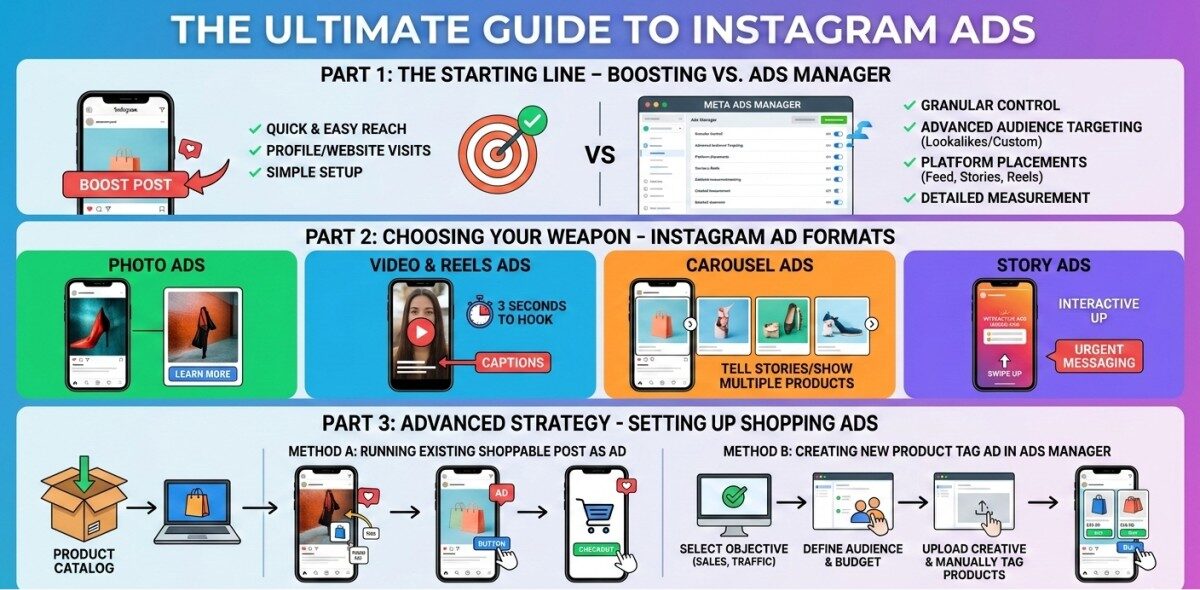
Part 1:The Starting Line for Instagram Ads – Boosting vs. Ads Manager
If you have ever pressed the “Boost Post” button on a high-performing organic post, you have already dipped your toes into Instagram advertising . Boosting is the easiest way to increase reach, but it comes with limitations.
The “Boost Post” Method for Instagram Ads
Boosting is done directly from the Instagram app. It allows you to turn an existing post into an ad quickly. You select a goal (like more profile visits or website visits), define your audience (Automatic or Manual), set a budget, and determine the duration .
When to Boost: This is ideal for beginners, time-crunched business owners, or promoting a post that is already performing well organically. It is quick and requires minimal setup. However, you sacrifice granular control over placement and advanced optimization.
The Power of Meta Ads Manager for Instagram Ads
For serious advertisers, Meta Ads Manager (formerly Facebook Ads Manager) is the command center. This is where you move from “boosting” to true “advertising.” It provides access to all of Instagram’s placements (Feed, Stories, Reels, Explore), advanced audience targeting (lookalike audiences, custom audiences), and most importantly, shopping features like product tagging .
Part 2:Choosing Your Weapon – Instagram Ads Formats
To manage ads effectively, you must match your creative to your goal. Here are the primary formats you’ll work with in 2026:
- Photo/Image Ads: The classic format. Use high-contrast, bright imagery to stop the scroll. Keep text overlay minimal and let the visual do the talking .
- Video & Reels Ads: Short-form video dominates. With 85% of videos watched without sound, captions are non-negotiable . Ensure your hook lands in the first 3 seconds to prevent viewers from swiping away .
- Carousel Ads: Perfect for storytelling or showcasing multiple products. You can use a series of images or videos that users swipe through. Think of it as a mini-catalog within a single ad .
- Story Ads: These are full-screen, vertical ads that appear between users’ organic stories. They are immersive and best for creating urgency or driving impulse actions with “Swipe Up” (or link) CTAs .
- Collection Ads (Shopping): When a user taps on a Collection ad, it opens into an instant full-screen experience, allowing them to browse multiple products from your catalog without leaving the app .
Part 3: Advanced Strategy – Setting Up Instagram Shopping Ads
This is where the magic happens. Instagram Shopping ads (specifically product tagging) allow users to go from discovery to purchase in just a few taps. They can either buy directly on Instagram (if you have checkout enabled) or on your website .
Prerequisites: The Catalog
Before you can create ads with product tags, you need a product catalog. This is managed in Commerce Manager (within Meta’s ecosystem). Your catalog contains all the product data: names, prices, descriptions, and images . Ensure this is accurate and synced, as it will feed directly into your ads.
Method A: Running an Existing Shoppable Post as an Ad
This is the “best of both worlds” approach—leveraging organic content that already has product tags.
- Go to your Instagram profile and select the shoppable post you want to promote.
- Tap the “Promote” button below the post.
- You will go through the usual promotion setup (Audience, Budget, Duration), but the resulting ad will retain the product tags from the original post. This means users can tap the products and be taken directly to the checkout page .
Method B: Creating a New Product Tag Ad in Ads Manager
For maximum control, you’ll build the campaign from scratch in Ads Manager.
- Campaign Level: Click “+ Create” in Ads Manager. Choose a Sales, Traffic, or Engagement objective .
- Ad Set Level: Define your audience, budget, and schedule.
- Ad Level (Creative): This is the critical step.
- Select “Image Ad” or “Video Ad.”
- Upload your creative.
- Scroll down to the “Product” section. If you have a connected catalog, products will be available.
- Toggle on “Add Product Tags.”
- Click Customize and manually search for and select the specific products appearing in your image/video.
- You can tag multiple products in a single image (up to 5) or in a carousel. If using a carousel, ensure every image has at least one tag to be eligible .
- Click Publish. Your ad will now function as a digital storefront.
Part 4: Best Practices for 2026 – Making Your Ads Convert
Creating the ad is just the beginning. Here is how to ensure your campaigns perform:
1. Embrace the Native Feel
Users suffer from “ad blindness.” To combat this, make your ads look like organic content. If it looks too much like a stock photo or a overly produced commercial, users will scroll past. User-generated content (UGC) and influencer-style content often outperform high-gloss productions because they build trust .
2. Hook Them Immediately
You have roughly 3 seconds to grab attention before a user scrolls away . For video, introduce your brand or product immediately. Don’t start with a slow fade-in; start with the payoff.
3. Leverage Lookalike Audiences
If you have a customer list, website traffic, or engaged followers, use Lookalike Audiences. This Meta feature finds new people who share characteristics with your best existing customers. It is one of the highest-ROI targeting strategies available .
4. Optimize for Mobile
Over 80% of social media consumption happens on mobile .
- Text: Use large, readable fonts.
- Visuals: Avoid clutter.
- CTAs: Ensure buttons are tappable.
- Loading Speed: Compress images and videos so they load instantly.
5. Test and Measure
Never “set it and forget it.” Use A/B testing within Ads Manager to test different images, headlines, and audiences. Track metrics like CTR (Click-Through Rate) and ROAS (Return on Ad Spend) to determine what’s working . Pay attention to the Quality Ranking of your ads; higher relevance usually leads to lower costs .
Conclusion
Managing Instagram Ads is a journey. It starts with the simple act of boosting a post and evolves into managing complex, data-driven shopping campaigns within Meta Ads Manager. By understanding the different ad formats—from immersive Reels to product-tagged Carousels—and adhering to platform best practices, you can turn your Instagram presence into a powerful revenue channel.
Remember, the platform favors content that feels native and engaging. Combine that authenticity with the precision targeting of Ads Manager and the seamless experience of Shopping ads, and you’ll be well on your way to advertising success in 2026.